IT project portfolio: the practical guide to structuring it (Part 2)
Learn how to structure an IT project portfolio! This practical guide (Part II) covers the project vision and pillars (People, Process, Technology)
In the previous article, I walked through the first step toward structuring a Technology Project Portfolio and stopping the chaos of demands in a low-maturity PMO.
If you missed that part, click here and get ready for the first step.
That first step showed that the starting point is giving visibility to demand. If you already have a sense of the size of the work, let's move forward.
The Portfolio Management Area Project
Right now, you're likely staring at a blank page with a mission like: "Structure the area and show me a design of how it's going to work."
Having that kind of autonomy is great, but a broad, open-ended scope can also leave you lost, unsure where to start.
If that's where you are, don't worry! I'll walk you through the project vision I ran at the time, and hopefully it gives you some direction and insight to continue your own journey.
An overview of the project
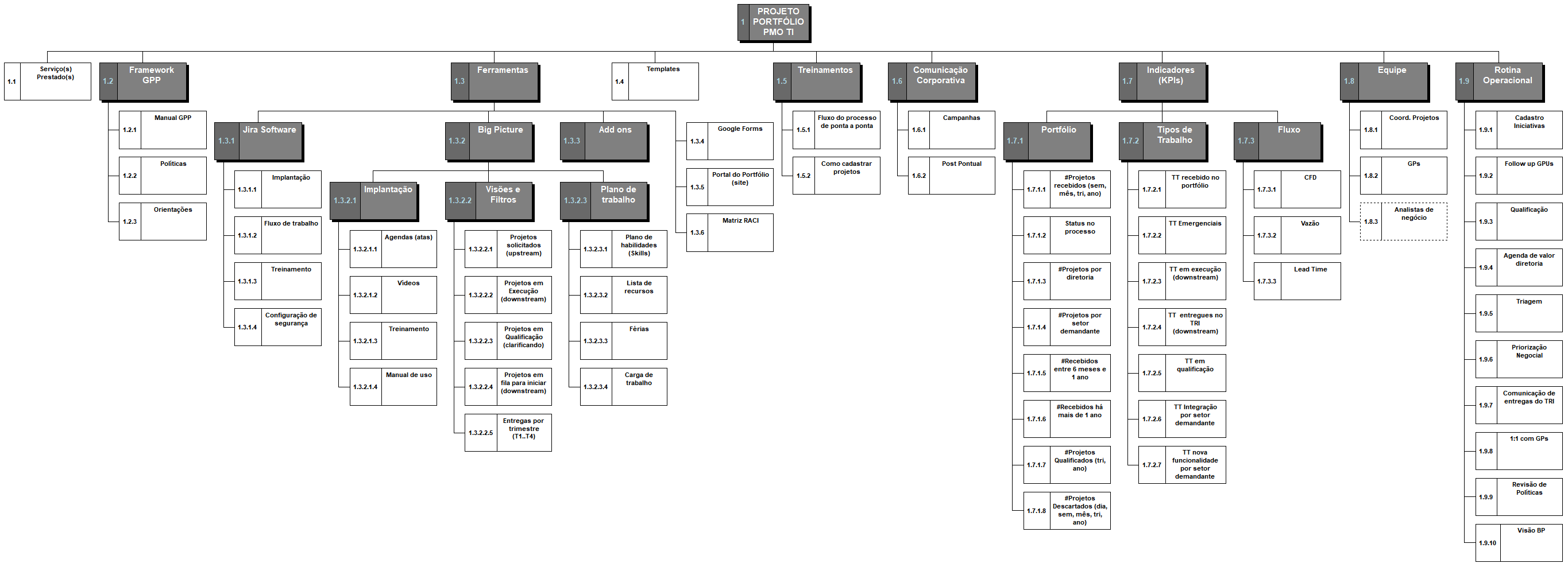
Looking at the full overview of the project can be intimidating, but don't worry, we'll break down the levels and everything will come together and make sense.
Think of your WBS as the detailed blueprint of a building, where every work package is an essential step. You can download a copy of this WBS at this link! Share it with your fellow PMs!
First-level view

I'll walk through the first level of the work breakdown structure for the Portfolio structuring project that I designed at the time.
The reasoning behind this model was to start with the service being delivered, in this case, Technology Project Portfolio Management.
You start by establishing what you're going to solve for the company, who the service is for, the expected outcome and what they value. From there, the rest gets easier.
With the service defined, structure the area around these pillars: Process, People and Technology (Tools). You can download a copy of this WBS at this link! Share it with your fellow PMs!
Now you'll understand what sits inside each of these levels and how they break down further.
1.2 PPM Framework:
This scope item refers to the working model that'll be used to deliver the Project Portfolio Management service, and it ties directly to the Process pillar. This includes the working manual/methodology, policies, and guidance on how things work.
Given the situation at my company, I proposed starting with Kanban principles, because I wanted to change as little as possible about how things already worked. At the time, this method helped bring visibility and a bit of organization to what was already working in the areas that interacted with projects.
1.3 Tools:
This item covers the work tools that support the processes behind delivering a great service to the company. Think of them as technologies that make managing tasks easier, centralize information for the area and streamline our communication, letting you and your team organize how work gets managed.
1.4 Templates:
Although producing models and templates for company-wide use wasn't part of the area design's initial goals, we created a few models to make adoption and use easier for the project managers' team.
1.5 Training:
Covers training, skill-building, knowledge transfer and every way of guiding and teaching people about the service, from formal training to small day-to-day guidance that builds understanding of how things work.
1.6 Corporate communication:
When it comes to creating a new unit within a company, communication is the most important (and most challenging) link.
Even if the new area sits inside a specific department, the project's impact is company-wide.
That's why an internal communication campaign, cross-team alignment and broad outreach are essential.
Trust me, a year after launch, we still had a lot of people and corporate areas that didn't know about the service we provided. The more informed people are about the area, the more valued it becomes.
1.7. Indicators (KPIs):
Having key indicators (KPIs) can start simple, but it's essential for spotting gaps and areas for improvement in your flow, service and, as a result, in your work's outcomes.
It's essential to start measuring data as soon as you start running the process.
1.8 Team:
Starting an area without a team is more common than you'd think. In the beginning, you'll likely take on the role of Portfolio Manager, Project Manager and handle the area's operational routines too.
With the project data you now have visibility into (first step), list and project the effort needed.
You can propose your team's composition based on that data and those estimates.
Show the current situation, the relationship between projects in progress and their benefits and costs.
Use the investment from the projects to recruit people for your area, and use custom AI agents or bots as your extra hands.
1.8 Operational routine:
Covers the activity map for the area's routines.
It's important to map the area's processes and activities to understand service limits and capacity.
This mapping helps with onboarding new PMs, makes communication with other teams easier and, most importantly, gets the house in order.
Conclusion
Now you have a view of the first level of work needed to structure a Project Portfolio area.
Your page is no longer blank. Use this model as your starting point.
Fortunately, this vision isn't a one-size-fits-all recipe you can just copy and paste or replicate exactly in your context. Yes, you'll need to think through whether each part makes sense for your context, and add or remove components.
Still, the base structure doesn't stray far from what's shown here, use it as your guide.
Here are some of the benefits we felt from doing this work:
- Visibility into the size of the work;
- Easier to know the status of actions;
- Reduced anxiety from seeing the bigger picture of the area;
- A reference resource for questions;
- Used in training and onboarding;
- A single place to centralize, consult and report on projects.
In upcoming articles, I'll go into detail on each of the pillars and first-level packages so we can keep moving forward on building your Project Portfolio Management area.
If this is your first time here, I suggest starting with this article.
Does this project structure make sense in your context?
Take care! ✋